Test Cases Are Not Business Outcomes
A passing individual test does not necessarily mean the user can complete the full business transaction.

Automai Tester
A test case can pass while the business process still fails.
Automai Tester executes the workflows users depend on — from login and navigation through transactions, validation checkpoints, and expected outcomes.
Validate complete business processes before release and after application changes, using reusable functional tests built around real user interactions.
Test workflows through supported enterprise application interfaces and review available execution evidence to understand whether expected outcomes were reached.
Test the workflow. Validate the outcome. Release with greater confidence.
See how Tester worksRelease Validation
Enterprise applications rarely operate as isolated features.
A user may need to log in, navigate multiple screens, enter data, submit a transaction, move between applications, and confirm an expected result before the business process is complete.
Testing individual functions can miss problems that appear only when those steps come together as a workflow.
Know whether the business-critical workflow reaches its expected outcome before users depend on it.
An individual test
Test passedThe complete business process
The user outcome
Conceptual illustration · not a product screenshot
A passing individual test does not necessarily mean the user can complete the full business transaction.
Changes to application screens, behavior, data, and connected systems can affect processes users rely on.
Functional testing should validate the complete user journey, not only isolated technical components.
User-Perspective Testing
Automai Tester executes user interactions through supported application interfaces, following the workflow from the user's perspective.
Build validation around the complete process:
The complete process
Instead of stopping when an individual feature responds, Tester follows the defined workflow and checks whether expected conditions are reached.
Execute the screens, actions, and transactions involved in the business process.
Define expected conditions at important points in the workflow to determine whether the process behaves as intended.
Apply test data to reusable workflows to validate different business scenarios without creating a completely separate workflow for each variation.
Validation
A workflow completing without an obvious error does not necessarily mean the business process succeeded.
Automai Tester uses validation checkpoints to evaluate expected conditions throughout the workflow.
These checkpoints help determine whether the automated process reaches its intended result.
Check for expected visual conditions within the application interface.
Validate expected field information at important points in the workflow.
Determine whether the business process reaches its defined expected result.
Check important conditions before, during, or after a business transaction.
Data-Driven Testing
Business processes often need to be validated with different users, records, inputs, and conditions.
Automai Tester supports data-driven functional testing, allowing teams to apply test data to reusable workflows and exercise multiple functional scenarios.
This helps teams keep the underlying business process consistent while varying the test cases used to validate it.
Create the sequence of user actions and validation checkpoints involved in the process.
Provide the data needed to exercise different functional scenarios.
Use Tester's test-case generation capabilities to prepare functional test variations from the defined workflow and applicable data.
Run the workflow using the applicable test data.
Review whether the defined expected outcomes are reached for each case.
Authoring
Automai Tester supports reusable no-code workflow validation centered on the actions users perform through application interfaces.
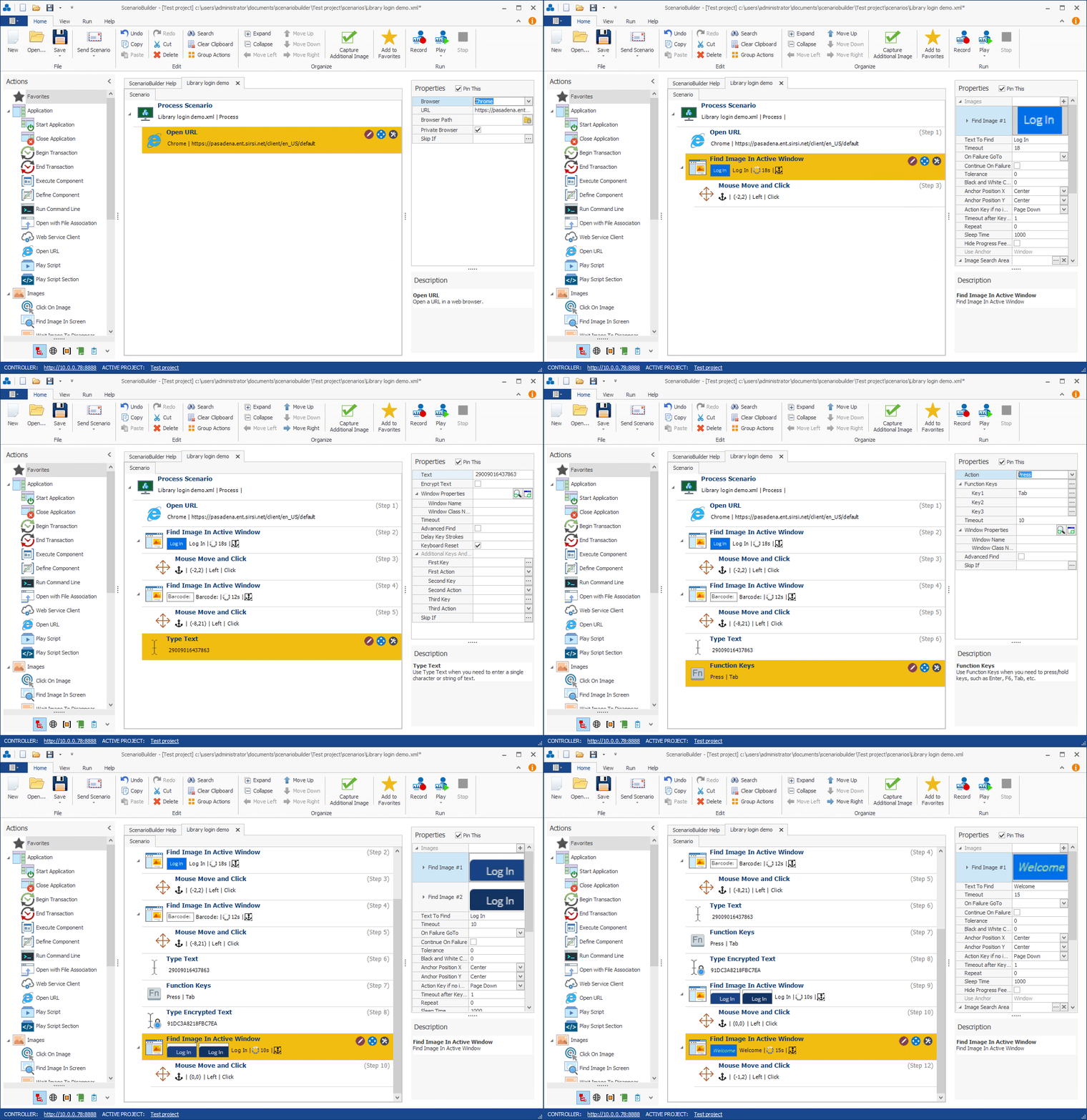
Workflow Validation
Automai Tester organizes functional validation around the workflow the user performs.
The authoring experience connects user actions with the checkpoints used to evaluate whether the process reaches its expected result.
Follow the defined sequence of actions that makes up the business process.
Define expected conditions that help determine whether the workflow behaves as intended.
Use the established workflow to support repeated functional and regression validation.
The proposed product content identifies ScenarioBuilder as the environment used to create functional-test workflows.
Build the workflow, define validation checkpoints, apply test data, and prepare the process for repeatable execution.
Build functional tests around the sequence of user interactions that make up a business process.
Organize workflow actions so established business processes can be executed repeatedly.
Add expected conditions to validate important stages of the process.
Prepare workflow execution using the applicable data and validation requirements.
Enterprise Environments
Enterprise workflows can involve browser-based applications, Windows software, virtual desktops, ERP systems, healthcare applications, and other enterprise technologies.
Automai Tester's user-level approach supports validation through compatible application interfaces.
Validate supported user workflows delivered through Citrix and virtual desktop environments.
Test supported desktop and legacy application workflows from the user perspective.
Validate login, navigation, data entry, submissions, and expected outcomes in supported browser-based applications.
Validate business-critical workflows involving supported enterprise application environments.
Test supported clinical and administrative application workflows.
Follow defined business processes that move between multiple supported application interfaces.
End-to-End Testing
Enterprise systems change continuously.
An update to one application, interface, or environment can affect a business process that depends on multiple screens, transactions, and handoffs.
Automai Tester supports functional validation around complete business workflows, helping teams determine whether important processes continue to reach their expected outcomes after change.
Test the complete business process, not only the changed component.
Validate critical workflows before a new release reaches production.
Re-run important business processes around application or environment upgrades.
Repeat established workflows to identify whether changes affect previously working processes.
Validate business journeys that span supported applications and systems.
Release & Regression Testing
Automai Tester supports repeatable functional and regression validation around application releases, upgrades, and environment changes.
Execute critical workflows to determine whether expected business processes work in the target environment.
Re-run established workflows and applicable data-driven cases to validate previously working processes.
Check whether important user journeys still reach their expected outcomes.
Reuse established functional-test workflows as applications and environments evolve.
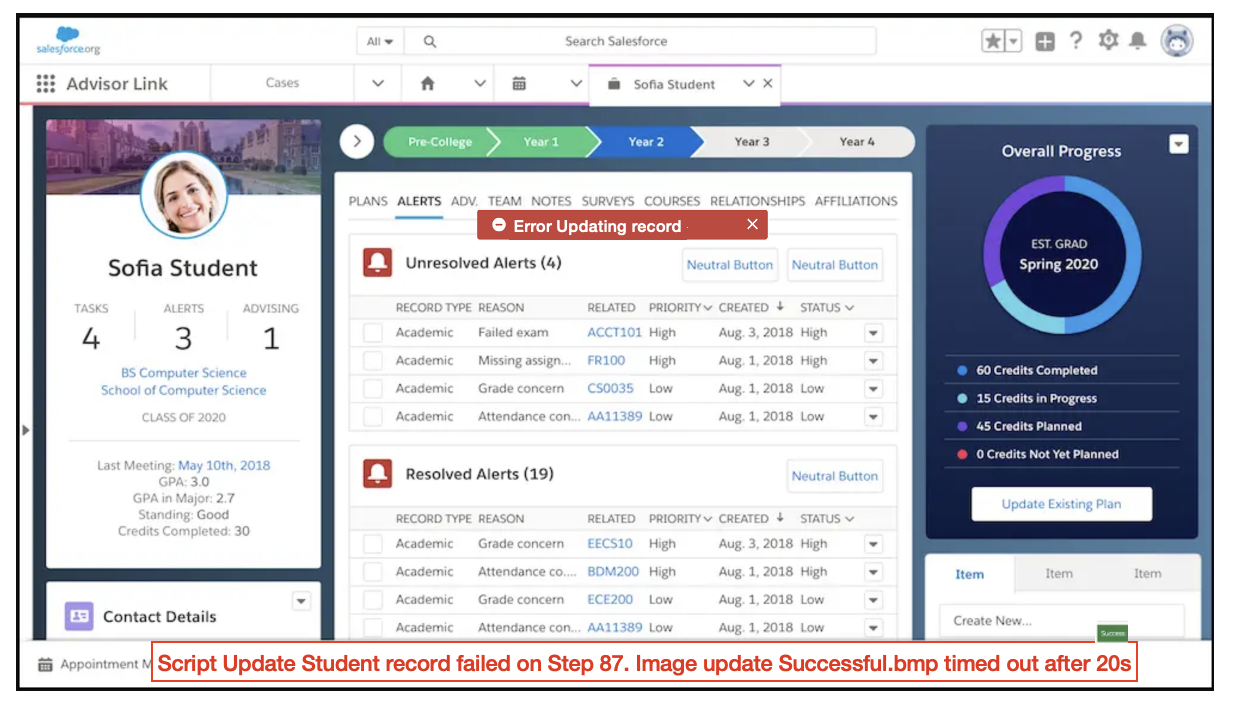
Test Evidence
When a business workflow fails, teams need more than a final test status.
Automai Tester uses defined workflow validation and available execution evidence to help teams investigate what happened during the automated process.
Review how the automated business process progressed through its defined actions.
Determine whether defined checkpoints reached their expected conditions.
Use available visual evidence to understand what appeared through the application interface during execution.
Review available workflow results to help investigate where the process stopped reaching its expected outcome.
Front-End Validation
Backend services, APIs, application components, and infrastructure may appear healthy while a user still cannot complete an important business process.
Automai Tester adds the user perspective by executing defined workflows through supported application interfaces.
Functional validation therefore extends beyond checking whether an individual component responds.
Can the user complete the workflow and reach the expected outcome?
Test Management
Automai's broader platform provides centralized coordination for workflow automation and execution.
For functional testing, reusable workflows and applicable test data help teams maintain consistent validation around important business processes.
Organize functional-test automation around repeatable business processes.
Use established workflows when validating changes across projects and releases.
Apply appropriate test data to reusable workflows for data-driven functional testing.
Use Automai's platform and Director capabilities to coordinate applicable automation and execution resources.
Automai Platform
Tester is part of Automai's broader workflow automation platform.
The platform connects performance testing, functional validation, and continuous production monitoring around real user workflows.
Validate business-critical workflows before release and after application changes.
Execute automated real user workflows under load to evaluate front-end transaction performance.
Monitor critical production workflows to detect failures and performance degradation from the user perspective.
Platform & Director
Coordinate applicable automation, scheduling, execution, reporting, alerts, and evidence across the Automai platform.
Tester and Journey
Automai Journey is identified in the current project materials as a live product centered on reusable business journeys and process automation.
Automai Tester addresses the functional validation of business-critical workflows before release and after application changes.
Both are part of Automai's broader workflow automation approach.
Common Use Cases
Validate that important application workflows produce their expected outcomes.
Repeat established workflows after application changes to identify regressions.
Check business-critical user journeys before a release reaches production.
Validate important processes around ERP, application, desktop, or environment upgrades.
Test complete business processes that move through multiple supported applications.
Apply different test data to reusable workflows to exercise multiple functional scenarios.
FAQ
Common questions about functional testing and validating business-critical workflows before release.
Book DemoAutomai Tester automates functional validation of business-critical user workflows.
It executes the actions involved in defined processes through supported application interfaces and checks expected conditions and outcomes.
This helps teams validate important workflows before release and after application changes.
Feature testing checks whether an individual function behaves as expected.
Workflow testing follows the larger business process, including navigation, data entry, transactions, validation checkpoints, and potentially multiple applications.
The goal is to determine whether the complete expected business outcome can be reached.
Yes. Tester supports repeatable execution of established workflows to help teams identify whether application changes affect previously working business processes.
Yes. Tester supports functional validation around releases, application upgrades, and environment changes.
Teams can execute important workflows and check whether expected outcomes are reached.
Yes. Tester supports data-driven functional testing, applying test data to reusable workflows to exercise different scenarios.
The approved product positioning also includes generated test cases.
Tester uses defined validation checkpoints to check expected conditions during workflow execution.
These checkpoints help determine whether the workflow reaches its intended result.
Tester provides workflow validation results and available execution evidence to support investigation of unsuccessful tests.
Depending on the current product capabilities and environment, this may include visual evidence and information about workflow progression.
Automai's workflow-based approach supports business processes that move between compatible enterprise application interfaces.
Specific Tester compatibility and cross-application handoff behavior depend on the applications and environments involved.
The current Tester materials identify Citrix, Azure Virtual Desktop, and RDP as relevant environments for workflow validation.
Support for a particular implementation depends on the application, version, session type, and deployment configuration.
Automai Tester is positioned around reusable no-code functional workflow validation.
Its authoring approach focuses on user interactions, workflow actions, and validation checkpoints.
Automai Journey focuses on reusable business journeys and process automation, while Tester focuses on functional workflow validation.
Both are part of Automai's broader workflow automation approach.
Next Step