Navigate
Follow the application path required to complete the business workflow.

Process Automation
Business processes often require users to navigate multiple applications, enter information, complete transactions, and confirm outcomes.
Automai's user-level automation approach focuses on these repeatable workflows, helping organizations automate business processes through supported application interfaces.
Automate the workflow. Validate the outcome. Understand what happened.
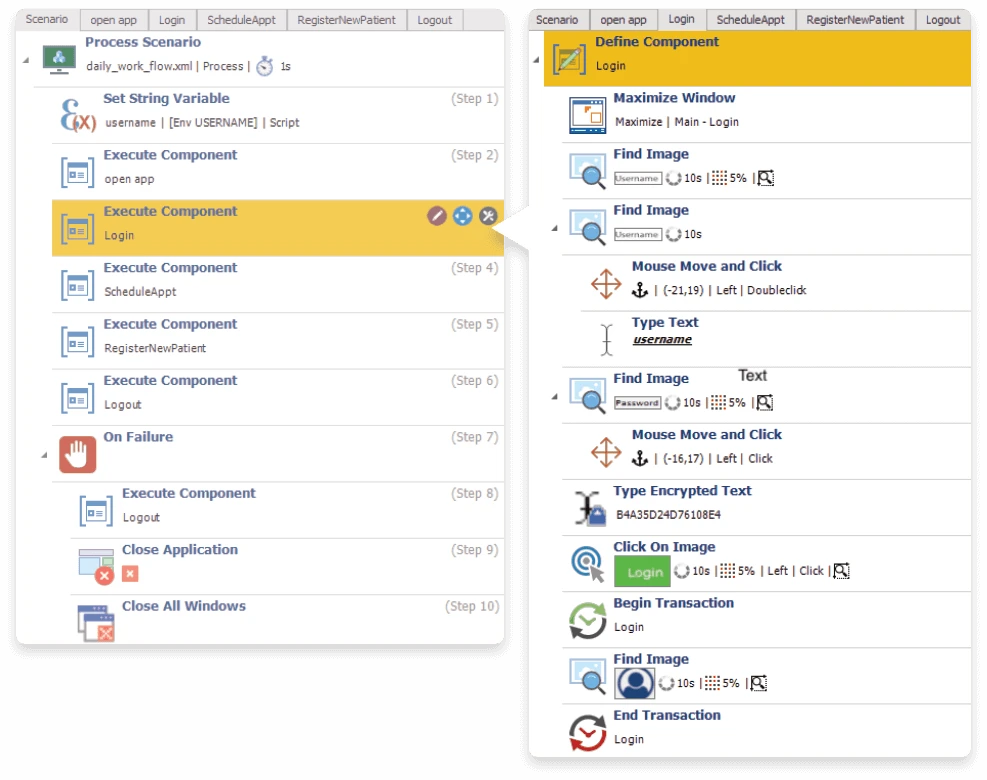
Focus automation on the complete business process rather than treating every screen as an isolated task.
Explore the workflowThe Approach
Enterprise teams perform business processes that follow established paths.
A workflow may require someone to open an application, locate information, enter or update data, move to another system, complete a transaction, and confirm the result.
Automai approaches process automation through the user interface, focusing on the steps required to complete the business process.
This workflow-based approach is relevant to repeatable operational tasks that involve supported enterprise applications and environments.
A business process, end to end
End-to-End Workflows
Repeatable business processes may involve several screens, fields, applications, and expected outcomes.
Automai's user-level approach focuses on the actions required to complete these processes.
The complete workflow
Follow the application path required to complete the business workflow.
Perform user-level actions involving application screens, fields, selections, and controls.
Execute the steps involved in completing a defined business transaction.
Continue the process through supported application interfaces and environments.
Check whether the automated workflow reaches the expected business outcome.
Use available execution results to understand what happened when the workflow ran.
The focus remains on completing the business process from the user perspective.
Across Applications
Enterprise business processes often involve different application technologies.
A process may begin in a browser, continue through a desktop application, and depend on another enterprise system before the work is complete.
Automai's user-interface-based approach focuses on the business process across supported application environments.
One workflow across application interfaces
Cross-application workflows
Automate repeatable workflow steps performed through supported browser-based applications.
Include user-level actions performed through supported Windows and desktop application interfaces.
Apply workflow automation to supported virtual desktop and remote application environments.
Build automation around repeatable processes involving supported ERP, CRM, and other enterprise applications.
Represent processes that move between supported application interfaces as part of a larger business workflow.
User Interactions
Business processes are experienced through application interfaces.
Users navigate screens, enter information, submit transactions, and check outcomes to complete their work.
Automai's broader automation approach operates at the user-interaction level, allowing workflows to be represented around the actions involved in completing a business process.
This is particularly relevant when operational work crosses application and technology boundaries.
User-perspective automation
Start with the work the user needs to complete.
Reusable Workflow Assets
Different operational workflows may involve similar application screens, actions, and transaction steps.
Organizing automation around reusable workflow assets can provide a shared foundation for repeatable execution.
Automation is easier to understand when the workflow reflects the actions required to complete the business process.
Automai's workflow-based approach focuses on representing application steps and expected outcomes.
Teams can begin by defining the process, identifying the relevant application interactions, and describing the result the automation needs to achieve.
The exact workflow-authoring experience depends on the current product capabilities.
Identify the application path, required actions, and expected business outcome.
Represent the user interactions required to complete the process.
Run the workflow through the relevant supported applications and environments.
Check whether the process reaches its expected outcome.
Review available execution results and workflow evidence.
Update workflow assets as application interfaces and business processes change.
Execution Evidence
When an automated workflow fails or does not reach its expected outcome, teams need information about what happened during execution.
Automai's broader platform positioning emphasizes user-side evidence as part of workflow validation.
Evidence model
Conceptual overviewReview available information about completed and failed workflow executions.
Use available visual context to investigate what appeared through the application interface.
Review available timing information to understand workflow performance.
Check whether the automated process reached its expected result.
Execution evidence helps connect automation results with the business process being performed.
Automai Platform
A business workflow may need to be executed operationally, validated before release, monitored in production, or tested under load.
Automai's shared workflow foundation connects these activities through reusable automation assets.
Focus on repeatable operational workflows performed through supported application interfaces.
Tester
Validate important business processes and expected outcomes before application releases and changes.
Explore Automai TesterWatcher
Repeatedly execute critical workflows in production to detect failures and performance degradation.
Explore Automai WatcherLoader
Execute automated real user workflows under load to assess front-end transaction performance.
Explore Automai LoaderLoader, Watcher, and Tester are Automai's three primary products. Process Automation is presented here as a workflow automation use case, not an additional peer product.
Where to Start
Repeatable operational workflows can occur across many business functions.
The examples below illustrate potential areas for evaluation. They do not imply that Automai provides prebuilt automation for every process or application.
Evaluate repeatable tasks involving supported customer-service applications, record updates, and defined operational workflows.
Explore automation opportunities around repeatable HR processes performed through supported enterprise applications.
Evaluate defined operational workflows involving supported financial and enterprise applications.
Explore repeatable administrative processes involving supported healthcare application environments.
Evaluate workflows involving financial data entry, record handling, and defined transaction processes.
Explore repeatable processes involving supported supply-chain and enterprise applications.
Select the First Workflow
Not every business task requires a large automation initiative.
A useful starting point is a process with clear steps, a defined outcome, and repeatable user interactions.
The process follows a recognizable sequence of actions.
The workflow supports an operational outcome that matters to the organization.
The work involves interactions through supported application interfaces.
The expected workflow and successful outcome can be described clearly.
The organization benefits from understanding whether the automated process completed successfully.
Existing Enterprise Environments
Enterprise organizations often depend on a combination of modern applications, desktop software, ERP systems, virtual environments, and established business platforms.
Replacing these systems is not necessarily the objective when evaluating automation.
Automai's user-level approach focuses on the business process across supported application interfaces.
Teams can begin by identifying a repeatable workflow and evaluating how automation could fit within the existing environment.
The starting point
Collaboration
Successful workflow automation requires understanding both the business process and the environment where it operates.
Business and technical teams contribute different perspectives to defining and maintaining automation.
Identify repeatable processes, describe the required actions, and define the expected operational outcome.
Evaluate workflow automation requirements, execution practices, and maintenance needs.
Help assess application environments, access requirements, compatibility, and technical constraints.
Keep the business process central while applying the technical practices required for enterprise automation.
FAQ
Common questions about automating repeatable business processes through enterprise application interfaces.
Book DemoAutomai Process Automation is the proposed solution area for executing repeatable business workflows through supported application interfaces.
It focuses on user-level processes that can involve multiple screens, actions, applications, and expected outcomes.
The proposed Process Automation approach focuses on repeatable workflows with defined application steps and expected outcomes.
Potential processes may involve supported web, desktop, virtualized, and enterprise application environments.
Specific compatibility and workflow requirements must be evaluated.
Cross-application workflow execution is part of Automai's proposed Process Automation positioning.
The exact supported application combinations and execution conditions depend on the current product capabilities.
Automai's broader platform uses a user-level approach across supported application environments.
Process Automation-specific compatibility must be confirmed for the relevant desktop and web applications.
Automai's broader platform supports user-level workflow automation in virtualized and remote environments.
Automai provides workflow-authoring capabilities for creating automation around user interactions and business processes.
The proposed Process Automation approach begins with identifying the business process, representing the required application interactions, and defining the expected outcome.
The proposed Process Automation content identifies execution results and user-side evidence as important parts of the workflow automation experience.
Automai's approved platform positioning includes reusable workflow automation across performance testing, functional validation, and continuous monitoring.
Start with one repeatable business workflow.
Identify the applications involved, the steps required to complete the process, and the expected outcome.
Automai can use this information as the starting point for evaluating the relevant automation approach.