Define the access path
Identify the application, client, location, and environment to be exercised.

TRUST CENTER
Before validating critical workflows, enterprise teams need to understand where automation runs, how access is managed, which evidence is captured, and who owns the response.
This overview describes the front-end workflow model and the topics to confirm during a technical or security review. It is not a substitute for product-specific architecture or compliance documentation.
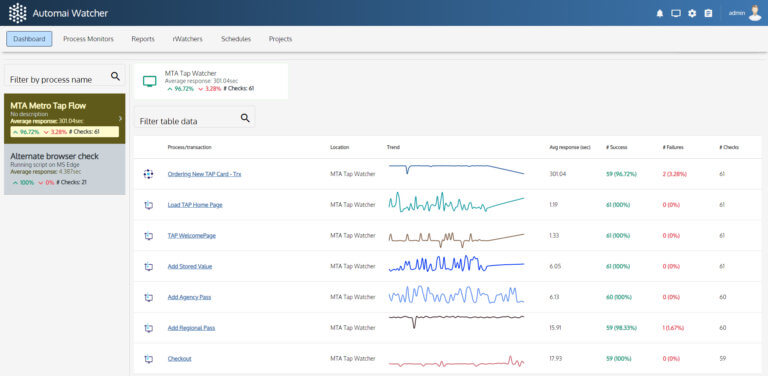
Automai’s front-end approach runs automated interactions along a chosen user access path. Depending on the supported deployment design, execution can be arranged on hosts representing the relevant desktop, virtual desktop, or application environment.
Identify the application, client, location, and environment to be exercised.
Set the business process, test accounts, schedules, and responsible teams for review.
Validate actual host requirements, permissions, network paths, and any environment-specific limitations with the product team.
A secure rollout depends on the approved configuration and organizational controls. Use these as review topics, not as claims that any specific control is already implemented.
Review BotManager or execution-host placement, operating-system prerequisites, connectivity, and the boundaries of the target application environment.
Confirm approved test identities, credential handling, least-privilege requirements, and account ownership.
Review the fields, screenshots, timing information, and records produced by a specific workflow, including sensitive-data exposure.
Confirm alert routing, storage, access permissions, retention, escalation, and deletion practices for the chosen configuration.
The prototype describes run, failure, timing/trend, and follow-up records. Exact fields and availability differ by product and version and need current verification before they are presented as guaranteed functionality.
Workflow or scenario identifier, time, execution location, and status, where available.
Failed step and relevant on-screen evidence, when configured and supported.
Recorded transaction or workflow timing and trend views, where supported.
Documented owner, investigation, maintenance, or expansion decision in the customer process.
Workflow validation should work alongside the organization’s security review, release governance, APM, ITSM, and support practices rather than be described as replacing them.
Select one workflow, one environment, one owner group, and explicit success criteria before expanding.
A successful workflow run is useful evidence of that execution; it does not by itself certify infrastructure, data protection, or regulatory compliance.
Review architecture, supported product/version behavior, current security documentation, and any customer-specific requirements with an authorized technical contact.
The source describes a front-end model that may allow execution without installing on application servers in appropriate architectures. Exact host, agent, and environment requirements must be confirmed for the chosen product/version; do not treat “no installation” as a universal promise.
Specific storage locations, access controls, encryption, retention, and deletion policies were not established by the supplied documents. These must be answered through an approved security and architecture review.
No certification evidence was supplied for this review. Do not publish badges, audit results, or certifications without current approved documentation.
No. User-side workflow evidence provides an additional operational perspective and should complement—not replace—existing monitoring and controls.
Bring the workflow, access path, environment, control requirements, and operational owner to a technical discussion.