Validate public-service workflows before disruption reaches users

Government and public sector organizations depend on interconnected applications to deliver essential services, manage records, process requests, and support daily operations.

A workflow can fail or slow down even when the underlying systems remain available, preventing staff or service users from completing critical tasks.

Automai helps public sector teams test performance under load, validate application workflows before changes, and monitor critical processes in production across virtual desktops, legacy systems, web portals, and integrated application environments.

Public sector staff working together

Public services depend on applications working together

Government and public sector workflows often involve multiple applications, user interactions, access methods, and system handoffs.

A process may begin through a web portal, continue in an internal application, and require validation or approval before completion.

When one step fails, the entire service workflow can be interrupted.

Citizen service requests

Public-service workflows may involve searching for records, completing forms, submitting requests, and confirming outcomes. An application may remain accessible while a submission fails or an expected confirmation does not appear.

Legacy application environments

Many operational processes depend on established desktop and client/server applications. Changes to operating systems, application configurations, or connected systems can affect workflows that previously worked correctly.

Virtual desktops and remote access

Staff may access business-critical applications through Citrix, Azure Virtual Desktop, or other supported virtual desktop environments. A successful session login does not necessarily mean that users can navigate applications, submit information, or complete expected transactions.

Application updates and infrastructure changes

Software upgrades, infrastructure migrations, and access-layer changes can introduce unexpected failures in existing workflows. A technically successful deployment does not always establish that business processes continue to work.

Service continuity and disaster recovery

After failover or a recovery event, applications may be available while critical workflows remain incomplete or perform differently. Teams need to validate whether users can complete the processes required to resume normal operations.

Automai helps organizations evaluate these challenges through real user workflow execution.

Restored systems do not always mean restored services

Infrastructure monitoring, application health checks, and system recovery tests provide important visibility into the availability of public sector applications.

However, these checks do not always establish whether staff and service users can complete the workflows they depend on.

Automai complements existing monitoring and recovery validation by executing workflows through the user interface and evaluating whether expected steps and outcomes are completed.

This helps teams identify where workflows fail, where delays occur, and whether critical services can be completed following application or infrastructure changes.

For example:

  • A citizen services portal may load successfully while a request cannot be submitted.
  • A legacy desktop application may launch while a critical transaction fails.
  • A virtual desktop session may connect while an internal application becomes unresponsive.
  • An infrastructure failover may complete while a workflow involving multiple systems remains interrupted.
  • An application upgrade may pass technical checks while a previously working approval process fails.

These are illustrative scenarios, not documented public sector customer incidents.

Test, monitor, and validate public sector workflows across the application lifecycle

Automai supports public sector teams through three complementary products, each addressing a different aspect of workflow reliability.

Loader — Evaluate application performance under load

Automai Loader executes real user workflows at scale to evaluate application behavior under concurrent activity.

Public sector teams can use Loader to assess workflows involving service requests, internal applications, web portals, and virtual desktop environments before releases or anticipated periods of increased demand.

Loader helps identify performance degradation, slow transactions, and workflow failures under load.

Explore Loader

Watcher — Monitor critical service workflows in production

Automai Watcher repeatedly executes configured workflows to detect failures and performance degradation from the user perspective.

Teams can monitor selected processes such as application access, service submissions, record updates, and workflows spanning connected systems.

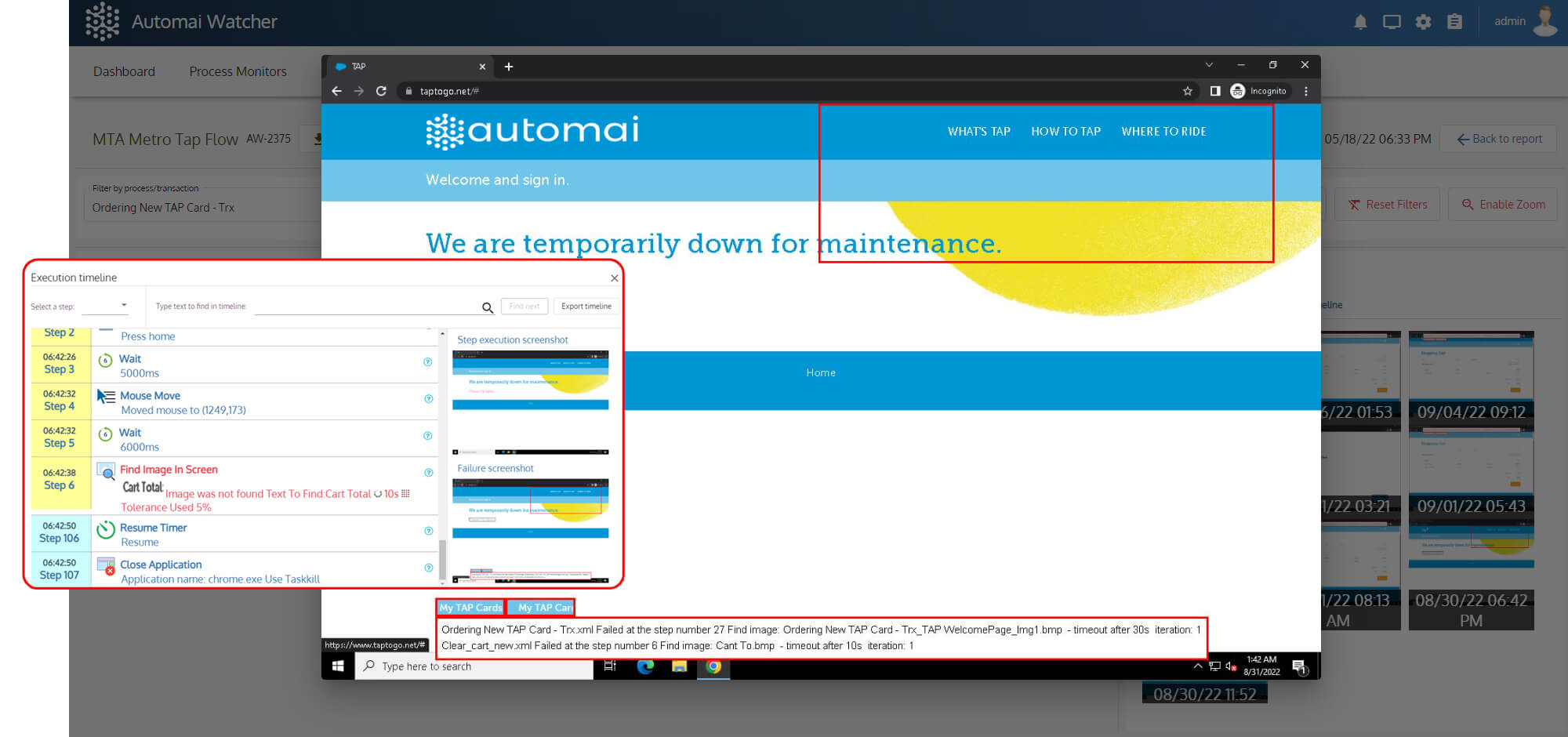
Execution evidence helps investigate failures and understand where a process encountered a problem.

Explore Watcher

Tester — Validate workflows before application changes

Automai Tester supports functional validation of business processes across application screens, fields, checkpoints, and expected outcomes.

Teams can create and reuse workflows to validate service requests, administrative processes, and internal application interactions before upgrades, migrations, or infrastructure changes.

Tester can also support validation of selected workflows following recovery or failover, subject to the environment being accessible and configured for testing.

Explore Tester

Validate the workflows that keep public services running

Government organizations rely on applications supporting service delivery, administrative operations, record management, and business continuity.

Automai's workflow-based approach can be applied to processes where successful completion matters.

Citizen service workflows

Validate the application steps involved in searching for information, submitting requests, and confirming service outcomes.

Example workflow

  1. Access service portal
  2. Select service
  3. Enter information
  4. Submit request
  5. Verify confirmation

Legacy application workflows

Test processes performed through desktop and client/server applications, particularly when application or infrastructure changes may affect established workflows.

Example workflow

  1. Launch application
  2. Log in
  3. Search record
  4. Update information
  5. Save
  6. Verify result

Virtual desktop and remote access workflows

Validate business processes accessed through supported virtual desktop environments.

Example workflow

  1. Connect to virtual desktop
  2. Launch application
  3. Navigate to task
  4. Submit information
  5. Confirm completion

Service continuity and disaster recovery

Validate critical application workflows after failover, infrastructure recovery, or continuity exercises.

Example workflow

  1. Restore application access
  2. Log in
  3. Execute critical process
  4. Submit transaction
  5. Verify expected outcome

Administrative approvals and record management

Test workflows involving record updates, approvals, and handoffs between connected administrative applications.

Example workflow

  1. Open request
  2. Review information
  3. Submit approval
  4. Update record
  5. Verify status

These examples illustrate potential workflows. They do not imply prebuilt government templates, verified agency deployments, or support for every legacy application.

Understand whether critical services work after changes or recovery

When an application changes or a system is restored, teams need more than confirmation that the infrastructure is available.

They need evidence that critical workflows can be executed and completed.

Automai supports investigation and validation through workflow execution results and product-specific evidence.

Workflow completion

Determine whether an executed workflow reached its expected outcome or encountered a failure.

Failed-step identification

Identify where a workflow stopped or failed, helping teams investigate the affected application interaction.

Performance and timing

Evaluate workflow execution times to identify delays that may affect service delivery or internal operations.

Screenshots and execution context

Review available visual evidence to understand the application state when a workflow encounters a problem.

Validation after changes or recovery

Execute selected workflows following application updates, infrastructure changes, or recovery events to assess whether expected processes remain functional.

Automai Watcher workflow failure screenshot
Example of Automai workflow execution evidence used to investigate application failures and validate expected outcomes.

Validate workflows across public sector application environments

Public sector operations may depend on a combination of legacy applications, web-based services, virtual desktops, and integrated enterprise systems.

Automai focuses on the workflows users execute through these environments and whether expected business processes complete successfully.

Legacy desktop applications

Validate workflows performed through supported Windows and client/server applications, including established operational systems.

Web applications and citizen portals

Test and monitor processes involving service submissions, record searches, administrative tasks, and online service interfaces.

Citrix and virtual desktops

Evaluate workflows accessed through supported Citrix and virtual desktop environments, including application validation following changes and performance testing under concurrent activity.

Integrated enterprise applications

Validate processes involving multiple application interfaces, such as administrative approvals, record management, and service request processing.

Disaster recovery and continuity environments

Execute critical workflows after recovery or failover to evaluate whether applications remain usable and expected processes can be completed.

Frequently asked questions

Automai executes real user workflows to evaluate application performance, monitor production processes, and validate expected outcomes. Public sector teams can focus on processes such as service requests, record updates, administrative approvals, and workflows accessed through virtual desktops.

Validate one public-service workflow before disruption reaches users