Prove critical product workflows before your customers do

Software vendors need to deliver applications that perform reliably across releases, customer environments, and changing infrastructure.

A product may pass internal checks while a critical customer workflow fails because of an application update, an environment-specific configuration, or a performance problem that only appears under concurrent activity.

Automai helps software companies test performance under load, validate critical product workflows before release, and monitor application behavior across desktop, web, Java, Citrix, and integrated environments.

By executing real user workflows, Automai helps teams identify failures, investigate performance degradation, and evaluate whether customers can complete the processes they depend on.

Software engineer reviewing application code at a workstation

Software reliability depends on how applications perform in real customer workflows

Software vendors must validate application behavior across releases, deployment environments, and customer configurations.

A feature may work in an isolated test while a complete user workflow encounters an unexpected error or delay.

When these issues reach customers, they can affect adoption, support operations, and confidence in the product.

Release validation across critical workflows

Application updates can affect existing user interactions, navigation paths, forms, and transaction steps.

A successful deployment does not always establish that the workflows customers rely on still complete as expected.

Performance under concurrent user activity

Applications may behave normally during functional testing but slow down or fail when multiple users execute workflows simultaneously.

Teams need to evaluate performance through realistic application interactions rather than relying only on backend measurements.

Differences between customer environments

Software may run across different operating systems, desktop environments, virtual desktops, and application configurations.

A workflow that completes successfully in one environment may behave differently in another.

Complex application interfaces

Products built on desktop, web, Java, or integrated application technologies may require validation across multiple screens and connected components.

A failure at one step can interrupt an entire customer process.

Monitoring after deployment

Software vendors need to understand whether important application workflows continue to work after deployment, updates, or infrastructure changes.

Application availability alone does not always reveal whether users can complete expected tasks.

Automai helps software teams evaluate these challenges through real user workflow execution, focusing on application behavior, performance, and expected outcomes.

Passing application tests does not always mean customer workflows will succeed

Unit tests, API checks, infrastructure monitoring, and application health metrics provide important information about software quality and availability.

However, they do not always establish whether a customer can complete an entire workflow through the application interface.

Automai complements existing testing and monitoring approaches by executing workflows through the user interface and evaluating whether the expected steps and outcomes are completed.

This helps software vendors identify where workflows fail, where performance degrades, and whether important customer processes continue to work across releases and environments.

For example:

  • A new release may pass backend tests while a critical form submission fails.
  • An application may respond normally while navigation between screens becomes slow.
  • A product may work in a development environment while a workflow fails in a customer's virtual desktop configuration.
  • An API may return a successful response while the application interface fails to display the expected result.
  • A monitoring system may report that the application is available while an essential user transaction cannot be completed.

These are illustrative scenarios, not documented software vendor customer incidents.

Test, monitor, and validate software workflows throughout the product lifecycle

Automai supports software vendors through three complementary products, each addressing a different aspect of application reliability.

Loader — Evaluate product performance under load

Automai Loader executes real user workflows at scale to evaluate how applications behave under concurrent activity.

Software vendors can use Loader to assess critical product transactions, navigation paths, form submissions, and integrated workflows before releases or anticipated increases in demand.

Loader helps identify slow transactions, performance bottlenecks, and workflow failures under load.

This helps teams evaluate performance through the interactions customers actually perform.

Explore Loader

Watcher — Monitor critical product workflows after deployment

Automai Watcher repeatedly executes configured workflows to detect failures and performance degradation from the user perspective.

Software vendors can monitor selected product workflows to identify problems following releases, configuration changes, or infrastructure updates.

Execution evidence helps investigate failures and understand where an application workflow encountered a problem.

Watcher may also support customer-facing monitoring services where the deployment and operating model have been confirmed.

Explore Watcher

Tester — Validate customer workflows before release

Automai Tester supports functional validation of workflows across application screens, fields, checkpoints, and expected outcomes.

Software vendors can create and reuse workflows to validate important product functionality before releases, upgrades, or changes to supported application environments.

This helps identify broken steps and incomplete processes before new versions reach customers.

Explore Tester

Validate the workflows your customers depend on

Software vendors deliver applications that must function across different releases, interfaces, and customer environments.

Automai's workflow-based approach can be applied to critical product processes where successful completion matters.

Release validation

Validate important customer workflows before new versions or application updates are released.

Example workflow

  1. Launch application
  2. Log in
  3. Navigate to feature
  4. Enter information
  5. Submit
  6. Verify expected result

Performance testing

Evaluate how product workflows behave when multiple users perform application interactions concurrently.

Example workflow

  1. Launch application
  2. Authenticate
  3. Execute transaction
  4. Submit request
  5. Measure execution time and result under load

Customer environment validation

Test configured workflows in supported environments that reflect where customers access and use the application.

Example workflow

  1. Access customer-like environment
  2. Launch application
  3. Execute critical workflow
  4. Verify completion
  5. Review execution evidence

Workflow monitoring for customer success

Monitor selected application workflows after deployment to identify failures and performance degradation.

Example workflow

  1. Access application
  2. Log in
  3. Navigate to critical function
  4. Execute configured transaction
  5. Verify expected outcome

Application upgrades and compatibility validation

Validate established workflows before and after changes to application versions, desktop environments, or connected systems.

Example workflow

  1. Execute baseline workflow
  2. Apply change in a controlled environment
  3. Re-execute workflow
  4. Compare results and timing

These are illustrative workflow examples. They do not imply prebuilt software vendor templates, universal application compatibility, or a verified managed monitoring offering.

Identify where product workflows slow down or fail

When a software release introduces an unexpected failure, teams need evidence to understand what happened and which application interaction was affected.

Automai supports investigation and validation through workflow execution results and product-specific performance information.

Workflow completion

Determine whether an executed workflow reached its expected outcome or encountered a failure.

Failed-step identification

Identify where a workflow stopped or failed, helping development and testing teams focus investigation on the affected application interaction.

Transaction and workflow timing

Evaluate execution times to identify delays affecting application navigation, transaction processing, and customer-facing workflows.

Screenshots and execution context

Review available visual evidence to understand the application state when a workflow encounters a problem.

Performance trends

Use supported reporting and historical execution information to evaluate changes in workflow behavior across testing and monitoring activities.

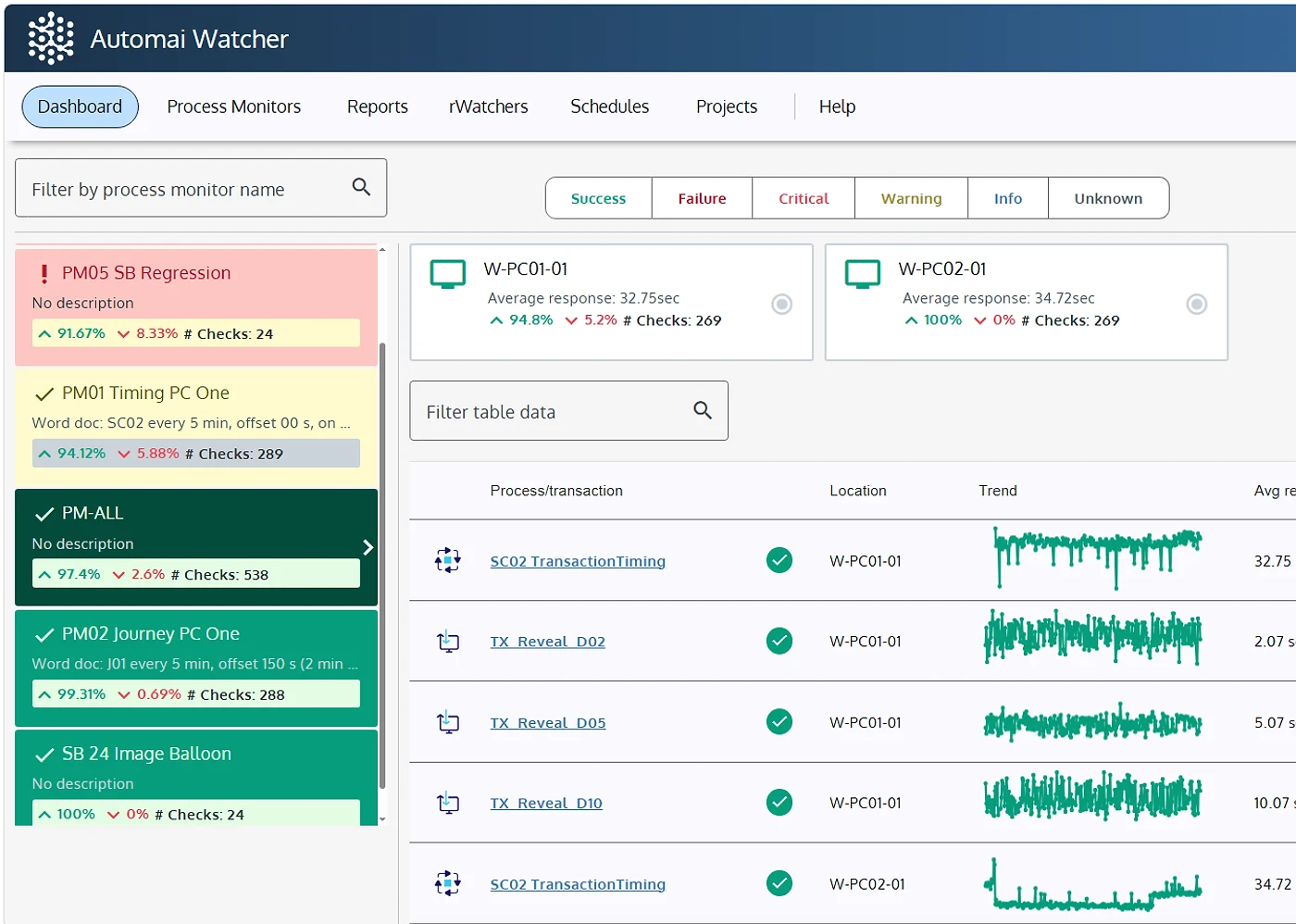
Automai Watcher dashboard with the SB Regression monitor in a failed state
Example of Automai workflow execution evidence used to investigate application failures and validate expected outcomes.

Validate product workflows across the environments your customers use

Software vendors may deliver applications across desktop, web, Java, virtual desktop, and integrated environments.

Automai focuses on how users interact with these applications and whether expected workflows complete successfully.

Web applications

Validate workflows involving application navigation, forms, transaction submissions, and connected web interfaces.

Windows and desktop applications

Test and monitor workflows performed through supported Windows desktop and thick-client applications, including established enterprise software.

Java applications

Validate supported Java application workflows involving user interactions, navigation, data entry, and expected outcomes.

Citrix and virtual desktop environments

Evaluate application workflows accessed through supported Citrix and virtual desktop environments, including functional validation and performance testing under concurrent activity.

Integrated and cross-application workflows

Validate business processes involving multiple application interfaces, including handoffs between desktop, web, and connected enterprise systems.

Frequently asked questions

Automai Tester supports functional validation of configured customer workflows before release. Teams can execute important application paths, verify expected outcomes, and identify failures introduced by application changes.

Validate one product workflow before your customers encounter a problem