Release & Upgrade Validation
Validate workflows before upgrades, patches, migrations, and image changes hit production.

Solutions
Start with the problem you need to solve — release risk, production monitoring, business process testing, or recovery validation — and run the real user workflow.
Use Cases
Automai maps the same workflow evidence model to the point in the lifecycle where the risk appears.
Validate workflows before upgrades, patches, migrations, and image changes hit production.
Monitor real user workflows in production and detect where transactions slow, break, or fail.
Test complete business workflows across applications, fields, data, and expected outcomes.
Prove users can still access, navigate, submit, and complete critical work after recovery.
Workflow Evidence
Automai keeps evidence tied to the workflow, so release, testing, monitoring, and recovery teams can act on the same facts.
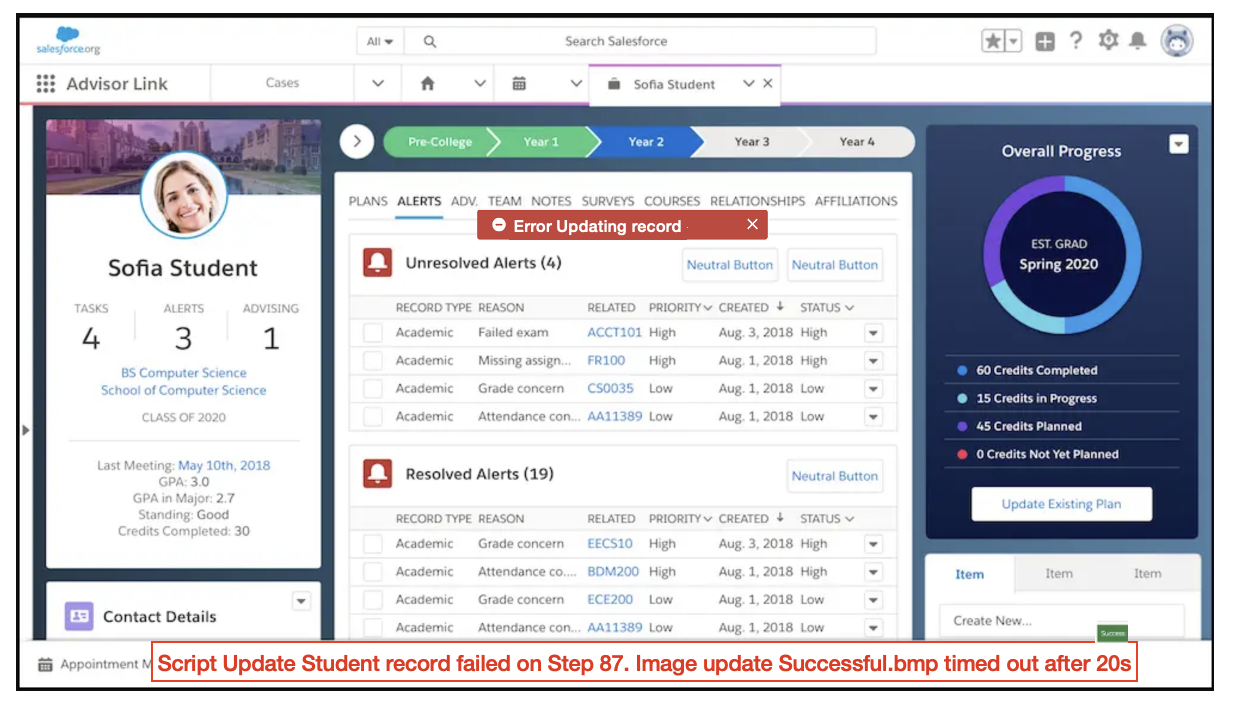
See the exact screen where the workflow failed.
Measure login, navigation, submission, validation, and completion steps.
Identify the missing field, slow screen, failed image, or broken transaction.
Application Coverage
Automai follows the workflow through the access layer, application screens, fields, data, integrations, and completion state.
Validate session launch, application access, and transaction completion.
Protect clinical and operational workflows across Epic-adjacent and Citrix paths.
Run ERP and CRM transactions from login through completion.
Keep thick-client, RDP, and older workflows visible.
Workflow Validation
Bring the environment, the user path, and the change or production condition your team needs to prove.